Web-ECDIS
Maritime simulation gear is expensive, and students rarely get enough lab hours on it. We built an offline-first ECDIS and Radar simulator that runs right in a web browser, so students can practice at home whenever they want.
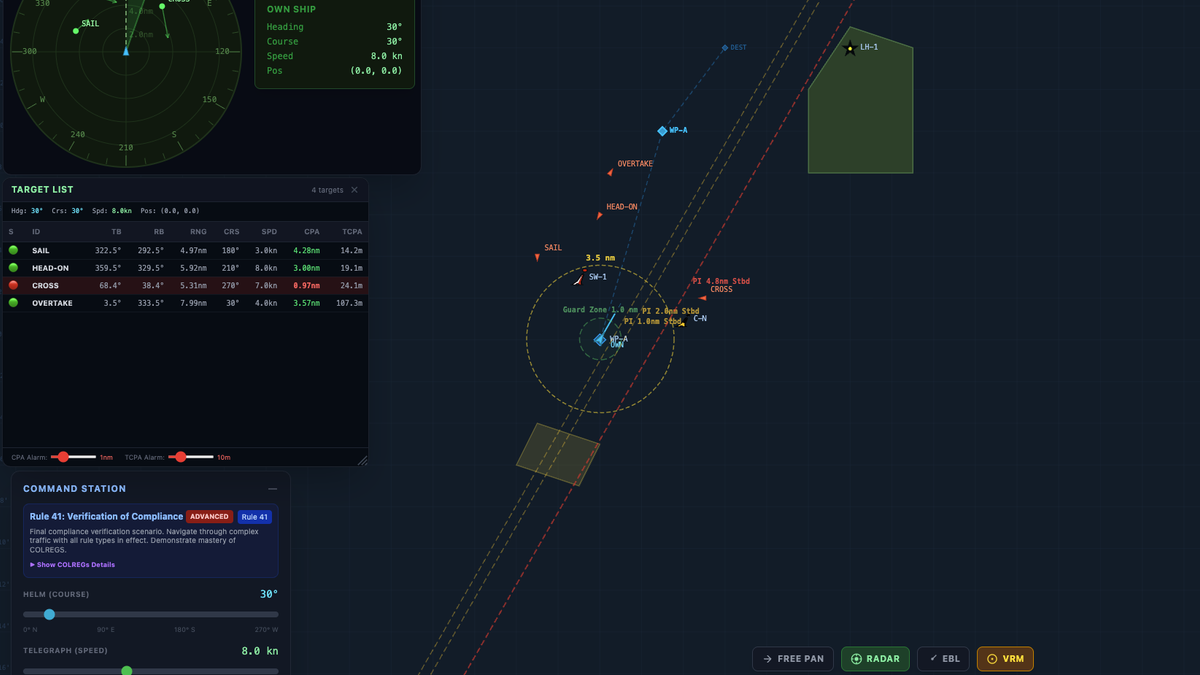
Web-ECDIS: Offline-First Maritime Navigation Simulator
A browser-based Progressive Web App (PWA) for ECDIS, Radar familiarization, and COLREGs training.
Project Overview
Maritime bridge equipment is expensive, and cadets rarely get enough lab hours on physical simulators. Web-ECDIS moves that training into an offline web app so students can practice from their own laptops or phones without needing an internet connection.
The app focuses on three core skills:
True heading vs. relative bearing: Reading and understanding vessel orientation.
Radar plotting: Tracking and interpreting targets on a simulated radar sweep.
COLREGs decision-making: Handling randomized crossing, overtaking, and head-on scenarios to prevent collisions at sea.
The Problem
Maritime schools rely on heavy, expensive simulator labs with limited seating. Because lab time is tight, cadets often memorize rules from a textbook without getting enough hands-on practice making real-time calls under pressure. Web-ECDIS fills that gap with a free simulation tool that runs locally in any modern browser.
Key Features
Offline-First Architecture: Runs completely offline using Service Workers and client-side state, requiring no persistent server or external database.
Randomized COLREGs Scenarios: Procedurally generates crossing, overtaking, and head-on traffic situations so every practice session is different.
Simulated Radar Display: Uses HTML Canvas and SVG to render the sweeping radar beam, range rings, and live target plots.
ECDIS Chart Display: Renders offline nautical charts via MapLibre and pre-cached vector tiles.
Ship Kinematics Engine: Computes speed, distance, time, and relative motion vectors in real time.
Installable PWA: Installs directly onto laptops, tablets, and phones for full-screen practice.
Thesis Outline
Chapter 1: Introduction
Background of the Study: The high cost of maritime training hardware and limited cadet access to physical ECDIS labs.
Statement of the Problem: Cadets lack enough hands-on hours to practice heading and bearing interpretation, radar plotting, and COLREGs decisions in real time.
Objectives:
Build an offline-first, browser-based navigation simulator.
Generate randomized COLREGs scenarios to test collision-avoidance decisions.
Model accurate ship kinematics (gyro, bearing, heading, and relative motion).
Scope and Limitations: Built strictly for educational familiarization, not real vessel navigation. Covers core COLREGs rules (crossing, overtaking, head-on) rather than multi-vessel fleet maneuvers.
Chapter 2: Review of Related Literature
The Role of Simulation: How bridge simulators improve cadet readiness and safety at sea.
Barriers to Entry: Cost and hardware constraints of traditional maritime training labs.
Web Technologies in Education: Using Progressive Web Apps (PWAs) to deliver training software in low-connectivity environments, including onboard vessels.
Chapter 3: Methodology and Architecture
System Architecture: Client-side data flow using browser storage and Service Workers so the app operates without a backend server.
Core Algorithms:
Vector math for Speed, Distance, Time (SDT), and Relative Motion.
Procedural generation logic for valid, randomized COLREGs traffic scenarios.
User Interface Design: Adapting standard ECDIS controls and layouts for laptop and mobile viewports with Tailwind CSS.
Chapter 4: Implementation
Frontend Shell: Structuring the SvelteKit application.
Mapping Integration: Setting up Svelte MapLibre and caching vector chart tiles for offline use.
Radar Simulation Logic: Rendering the radar sweep, range rings, and target tracks with HTML Canvas and SVG.
State Management: Using local reactive stores to run simulation physics and track scenario progress entirely on the client.
Chapter 5: Testing & Evaluation
Technical Testing: Verifying Service Worker caching and full offline execution across browsers.
User Testing: Usability sessions with maritime students.
Evaluation Metrics: Measuring improvements in student accuracy on radar plotting and COLREGs decision tasks.
Chapter 6: Conclusion and Future Work
Summary: Review of project goals and the practicality of browser-based maritime simulation.
Future Scope: Multi-user sessions (two cadets navigating the same shared scenario), voice commands, and dynamic weather or current effects.